Penn GSE · EDUC 5162
MoodBot Challenge
Exploring the limits of AI sentiment classification through an interactive Cognimates game.
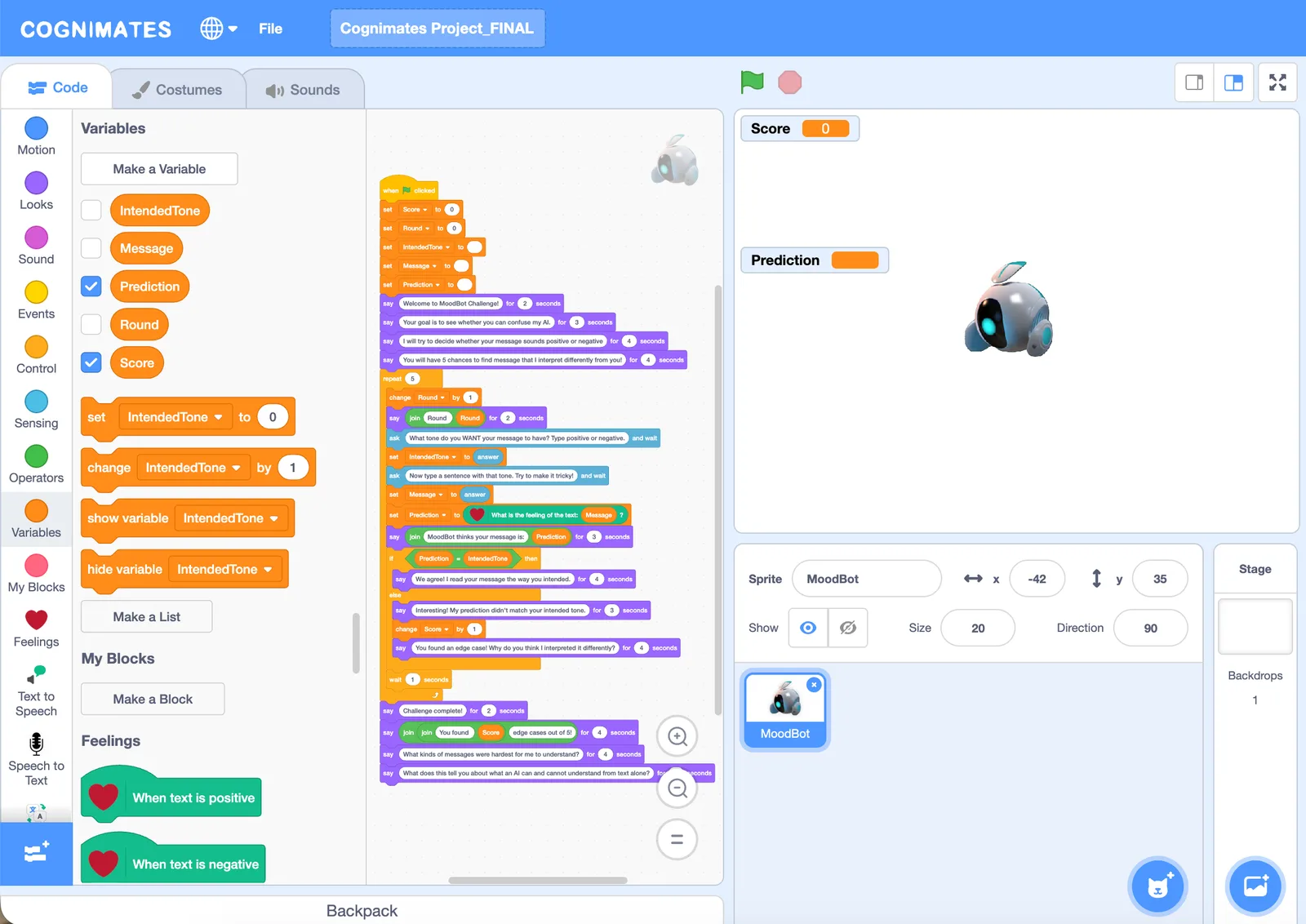
01 Overview
What happens when an AI reads your words differently than you intended?
MoodBot Challenge turns that question into a five-round game. Players choose a positive or negative tone, write a sentence, and compare their intent with Cognimates’ sentiment prediction. Each mismatch earns a point for finding an edge case.
My goal was to help learners explore how AI interprets the emotional tone of text and recognize that its predictions may differ from human intention. The game invites them to test the model, notice disagreements, and reflect on the information behind each interpretation.
02 Design challenge
How can an interactive game help learners question AI’s interpretation of human language?
I wanted learners to actively test predictions with ambiguity, sarcasm, slang, negation, and contextual meaning. A disagreement becomes a reason to ask what information the AI received—and what it missed.
03 Interaction design
Players repeat the message-and-comparison loop five times, then reflect on the edge cases they discovered.
- 1Choose intended tone→
- 2Write a message→
- 3AI analyzes text→
- 4Compare prediction→
- 5Find an edge case→
- 6Reflect
A matching prediction receives agreement feedback. A mismatch adds one point and prompts the player to think about why the interpretations differ.
| Round | Intended tone | Message |
|---|---|---|
| 01 | Positive | “I had such a great day today!” |
| 02 | Negative | “I really hated that experience.” |
| 03 | Negative | “Fine.” |
| 04 | Negative | “Great, more homework!” |
| 05 | Positive | “Not bad at all.” |
These are my inputs from the recorded demo. The tones describe my intention, rather than MoodBot’s predictions.
The sequence moves from explicit emotional language to ambiguity (“Fine.”), sarcasm (“Great, more homework!”), and negation (“Not bad at all.”). These examples let learners compare how wording and intended meaning can pull in different directions.
04 Building MoodBot
The green flag resets five variables. Inside a five-round loop, the program collects the intended tone and message, calls the Feelings block, and compares the returned prediction with the player’s intent.
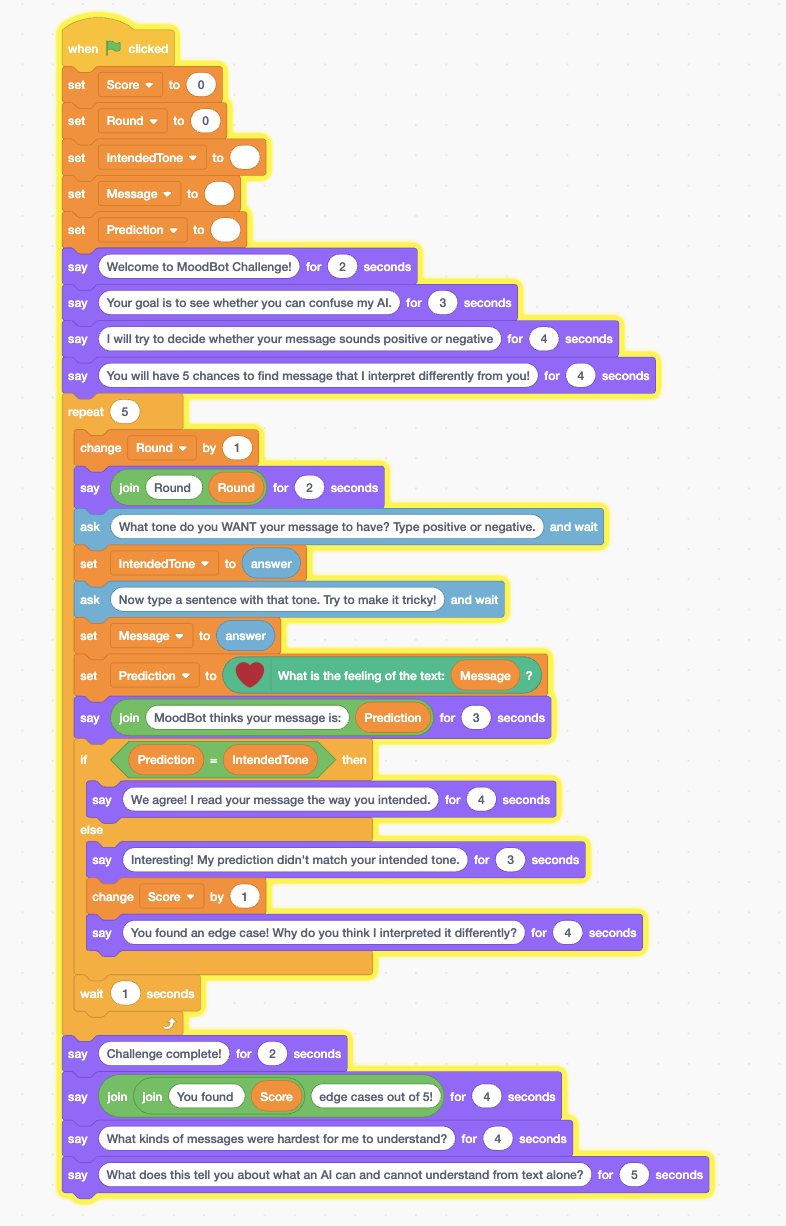
Five variables, one comparison
- Score
- Counts mismatches between the prediction and the intended tone.
- Round
- Tracks progress through five rounds.
- IntendedTone
- Stores the player’s chosen positive or negative tone.
- Message
- Stores the sentence the player enters.
- Prediction
- Stores the result returned by the Feelings block.
The Feelings block can return positive, negative, or neutral. The player chooses between positive and negative; any unequal result follows the mismatch branch.
Download the original Cognimates projectOpen the .sb3 file in Cognimates to inspect the blocks. The project uses its Feelings extension.
05 Testing & discovery
In my testing, I intended “Fine.” negatively, but MoodBot classified it as positive. That mismatch highlighted the information missing from text alone: tone of voice, facial expression, conversational context, sarcasm, and the relationship between speakers.
It also changed the way I wrote feedback. Instead of declaring the AI wrong, MoodBot says:
“My prediction didn’t match your intended tone.”
The wording leaves room for ambiguity and invites investigation.
06 Design iteration
Initial concept
A simple positive/negative text classifier.
Final concept
An AI investigation game with a character, five rounds, scoring, immediate feedback, edge-case testing, and reflection.
Exploring Cognimates’ Scratch-style format helped me see how a classification task could become a learning experience.
07 Learning design
Experiment, compare, reflect
Players create their own examples and see immediate feedback. Scoring rewards discovering a mismatch. The closing questions connect these individual surprises to a broader understanding of AI:
- What kinds of messages were hardest for me to understand?
- What does this tell you about what an AI can and cannot understand from text alone?
Research-informed design
Druga & Ko (2021) describe children testing assumptions and exploring edge cases to make sense of machine intelligence. MoodBot puts that investigation at the center of play.
Jia & Yu (2025) examine features that support active learning in children’s AI tools. I use experimentation and immediate feedback to encourage thoughtful participation.
Marx, Witt, & Leonhardt (2024) identify “Exactness” among students’ machine-learning misconceptions. Comparing intended meaning with a prediction gives learners a reason to question the expectation of a single objectively correct answer.
These ideas informed the design; the prototype does not establish measured learning outcomes.
08 What I learned
Unexpected model behavior can become a learning opportunity.
I learned that AI predictions are not simply “right” or “wrong.” Text classification depends on the information available to the model; it may miss context, tone of voice, sarcasm, and other cues people use to interpret meaning.
The “Fine.” test made that limitation concrete. Turning the classifier into a five-round challenge gave players a reason to investigate similar disagreements. I also learned that feedback matters: asking why a prediction differs from someone’s intention opens a richer conversation than declaring a winner.